
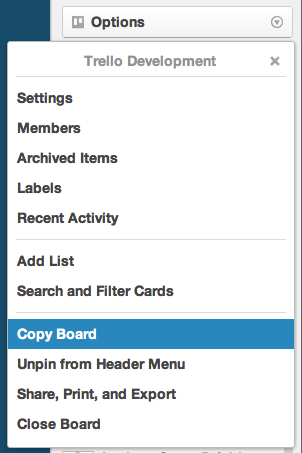
To do so, click the “Options” button in the board sidebar and select “Copy Board”. Give your new board a name and you’re good to go.
How will this get used? You might use it for recurring projects like new client work or weekly chores. It’s also great for setting up new employees. It may work better than a stale PDF and is easier to set up than a wiki.
You’re also able to copy any public board. So if you see a particular board structure you like you can copy it. You’ll have the option to keep or leave off copies of the current cards in case you want to start anew.
We plan to add list, card, and checklist copying in the future. We just didn’t want to give ourselves too many bugs all at once.
Color Blind Mode
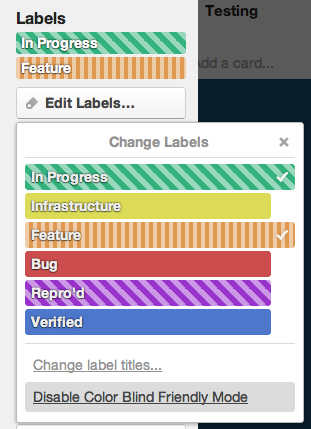
1 out of 10 people are color blind… is a statistic we’re pretty sure we heard one time. That makes card labels useless for a lot of people. We’ve added a color blind friendly mode to help. To enable, open the change label menu on a card and select “Enable Color Blind Friendly Mode” from the bottom. It should cover most common color vision deficiencies.
Updates to Card Subscribe
When we last spoke, we had just released card subscribe. We’ve since added some features to make it even better including a keyboard shortcut (“s”), a badge on the front of cards so you can quickly see what you’re subscribed to, and a subscribe action to the card menu. We’ve got more subscribe features planned.
Changing email address
Probably not our most exciting update, but an important one. You can now change the email address you use for logging in and receiving notifications. Visit https://trello.com/my/account and select “Change Email Address”.
As always, check out the Trello Development board to see what we’re working on next and to follow us on Twitter and Facebook for more updates.

Awesome! Great work Trello Team!
Actually, the inability to change email notifications was a major complaint of some people around the office. It seemed like something that should just be there. I’ll spread the word!
Thanks guys.. anything related to task priority ?
Nothing new concerning task priority. What sort of thing are you looking for? Would labels help?
My company would also like task priority and the ability to add more than 6 labels. Do you guys have that in the pipeline to happen somewhere down the road?
There’s a card for it here: https://trello.com/card/more-labels-tags/4d5ea62fd76aa1136000000c/1059
The ability to have completely custom labels would be most welcome. We’re using labels to show what category a task belongs to (forum, chat, etc.), and 6 is not nearly enough for us.
We use labels to prioritise our work – as you can name them we have red as high priority, orange as priority, green as good to go. etc.
Thanks! This is excellent.
Yay! Looking forward to Checklist and Card Copying!!!
I second that!
We’re working on card copy right now. https://trello.com/card/copy-card/4d5ea62fd76aa1136000000c/1272
Awesome, time to make my master board! Thanks for the continued hard work!
A big +1 from a colorblind user. Thanks!!!
Me too!! I really appreciate it!
For now, I only know two services that think of us: Trello and WOT (Web Of Trust). And it’s really really important and useful for us!
Thank you Trello team!!
Great start to the templates we need. Cards and checklists are going to be the most helpful for us so we wait with anticipation for those functions.
Card copy is our top priority right now. https://trello.com/card/copy-card/4d5ea62fd76aa1136000000c/1272
OK….newbie user, so flame gently.
I had seen some traffic about creating “dummy” user names to assign to projects (for people / roles who aren’t in Trello). Any update on this?
Would be great if we could just add something like a tag before a username and have Trello know it’s just a placeholder (e.g. ‘PIA FinanceGuy — the apostrophe is used in Excel and some scripting languages for comments).
Trello doesn’t currently have the concept of ‘dummy’ users, though it’s been talked about a lot. We agree it would be great and it’s something we want to add in the future.
We set this up via an alternate email that the company has – our generic admin@ email address. It works well.
Great. Projects templates!
Love it! When can I pay you for Trello? Dream feature list: #1 Change order of items entered on a list, #2 Reply to a comment someone makes on a list (threaded), #3 When entering a URL on a card, have an automatic thumbnail of the site appear next to the URL. Thank you!
Re: changing order of items entered on a list: I can do that via drag and drop. Either with cards (if that’s what you meant) or with checklists (if that’s what you meant). If neither of those, I’m curious what lists you are referring to.
FYI: You can already do #1 “re-order items on a list.” UI is not obvious, but place your cursor on the item, click, hold and drag. Item will move up or down the list.
The “Move” command on cards also let you move cards up or down the list, not just horizontally.
Thanks! I love all the updates you’re constantly putting in.
Now that you have a suscription feature, wouldn’t it make sense to add a filter option to only show cards you’re subscribed to?
There’s lots more we can do with filters. That would be a great addition.
I would recommend changing menu option from “Enable Color Blind Friendly Mode” to something sounding neutral. If the option sound like a confirmation of the *disability*… may be the afflicted guys might not want to use it!
:S hmm. I’m color blinded and the term being used is not offensive at all. If someone affected by this feels bad for ‘Enable Color Blind Friendly Mode’ is kinda stupid.
If you (or someone) knows a “polite” way of saying ‘color blinded’ please tell me, cuz I havent heard one.
“Those who are spectrally deficient”
“Color vision deficient” would be the proper technical term, but we haven’t heard any complaints about terminology.
Great update! Now a universal or native version for iPad is missing . Thank you.
My team is using the boards to manage projects, but we’re having issues with notifications. Whereas we used to get an e-mail each time we were mentioned on a card, e-mails are now delayed, intermittent or not going through entirely. The feature was working fine about a week ago. What happened?
Thant’s strange. Not much has changed with that code. Email support@trello.com with more detail about the issue and we’ll try to get it resolved. Sorry about the trouble.
Note that Trello will only notify you about things you don’t see. Check out this question on Stack Exchange: http://webapps.stackexchange.com/questions/23517/why-doesnt-trello-notify-me-of-actions-that-happen-on-my-boards-even-though-i/23621
Awesome..
1. Please add copy checklist to a new board too..
That’s pretty cool, but I need more colors for labels
It would be awesome if you added the ability to copy a card. Why? I have some cards with checklists that are 20 items long. They all belong in the same board. Since you added the ability to copy boards / adding the ability to copy cards should not be that hard. It would save me so much time vs. having to type in the same long checklist every single time.
We’re working on that right now! There’s a card for it here: https://trello.com/card/copy-card/4d5ea62fd76aa1136000000c/1272
Bravo and thanks. Would y’all please make a little video demonstrating all the new features?
YAY! I just finished a huge project where this would have come in wonderfully handy, which kind of stinks that I didn’t start the project today instead of this past Monday, but I also create horribly repetitive boards still in my daily life, just in a much less frenzied manner, so this is still a VERY welcome improvement! <3
I’d be the happiest man on Earth if you guys could add a fixed, different kind of list, for User Stories, or nested boards perhaps? Someway we could have different tracks where the tasks can be discriminated by Backlog Item.
This is a great feature to have. Is there a future plan to “Copy” a card?
Yes there are plans. We’re working on it now, in fact. There’s a card for it here: https://trello.com/card/copy-card/4d5ea62fd76aa1136000000c/1272
Keep up the good work guys.
Great job
You are all doing amazing work. Looking forward to the next new features!
Awesome – I love Trello! Is there a way to do the following yet that I have missed:
1. Organize cards in each list by due date with one easy click?
2. Get reminders of cards that are soon due or overdue?
3. Subscribe to ALL cards at once?
It just keeps getting better and better. I sing the praises of Trello every chance I get. Y’all are awesome!
AWESOME WORK, GREAT JOB!!!
Checklist copying next, pretty pretty please???
…
I use Trello for running 10 organizations, including multiple Boy Scout units. I have to tediously copy a multitude of checklist items for each scout’s merit badge requirements, it would help TREMENDOUSLY to have checklist copying!
Thanks so much!!!
We’re working on card copy first, then most likely on to checklist copying.
Fantastic! This is a very useful addition. Duplicating cards is more important to our workflow, but I’m all for any copy features at this point. Exciting.
We’re working on card copy right now, actually. https://trello.com/card/copy-card/4d5ea62fd76aa1136000000c/1272
Just started using Trello and now copying boards comes out. I hadn’t thought I could be anymore impressed!
Thank you!!!!! The copy board feature is a tremendous help.
I am an architect. Just started to use Trello for project managing – it appears to be a perfect match. Changed e-mail the old way by adding myself to each board as admin – and deleted the old account. That took quite a while – just read you incorporated this feature in this update an hour or so afterwards……. UUuuurghh. Anyways – thanks! You are doing a great job..!!
C
Guys, Trello is excellent. Congratulations for the continuous improvement, with great quality and the focus on quality.
Thank you! The copy board function will save me heaps of time.
What might be good though is to have a “save as template” option. That way we can create a skeloton board and save it as a template for use whenever we need it.
Awesome – amazing work guys/gals!
We originally went down the ‘save as template’ route and things got complicated fast. How do you update a template, how do you share templates, etc. “Copy” was easiest to communicate.
Good work! The copy board should be very handy to have.
I wonder if there’s a way to “flag” cards so that I can assign an action to multiple cards at once. – similar to how you use shift key or ctrl key to block several files on your my computer/finder then you can move/cut/copy/delete/etc.
Hi there! You are doing such a great job.
Do you plan to develop soon a CHAT ROOM feature? If you really are, do you considering that for both cases: private chat and all members chat?
It should be helpful at least for a fast communication with cross functional teams from different locations/countries etc.
Your guys are awesome!
And i really like Trello.
Great features. Thank you for quick improvements for subscribe feature. Keep it up
Just great, thanks so much for all your hard work
I haven’t found out the best way to use labels. Only one “awaiting response”
Please share your label usabe-examples!
First of all, great work, great tool!
One of my most requested “feature” is: please provide a native iPad app with card d&d. That would just be the perfect complementary bit to ensure a cross device usage. Smartphone is less important in my view as the screen is too tiny (even on my Galaxy S2) anyway.
Color Blind Friendly Mode is a massive help for me! Thanks
Changing Email Address: +1
What would my job be like without Trello! Thanks for such a great FREE tool… Keep up the good work!
You guys are Awesome… I mean it!
Stoked about the ability to make checklist boards…
Guys, I love this app so much, it’s been a huge help with both work and personal projects. Keep up the awesome work, solid stuff so far.
You guys rock! Seriously, you just gave me a week of my life that I would have otherwise been spending trying to mimic the board copy functionality via the API. We just had a meeting on Thursday afternoon regarding how critical it was that we be able to copy a “template” board.
Thank you for creating such an excellent product (and for FogBugz and Kiln, too, both of which we use extensively!)
Just joined the trello with my friends. Its good tool for project management.
Great Work Trello. Thank you!
Nice feature, see also https://trello.com/templates – which is empty templates based on “potential starting points” ideas I found on trello’s homepage.
Let me know if any ideas
Thanks.
Would love to have a capability to link cards across boards on Trello, any possibility???
Great job!!
Most awesome collaboration tool I’ve ever used….I’ve tried a lot of different apps to coordinate team efforts, but trello is for sure the easiest and flexible one. Great concept.
love it.
Cheers
Can’t wait to see the Copy “card” feature added.
Great job guys!
Cards stack – Lists of lists
On our projects we often use boards with cards and we like to stack cards to group sub features of a bigger feature to be developed.
It would be great to do this with trello.
So we could have lists of stacked cards representing features, moving the features from a “to-do” list to “to-verify” to “done” for exemple.
clicking a stack of cards would reveal the sub-list.